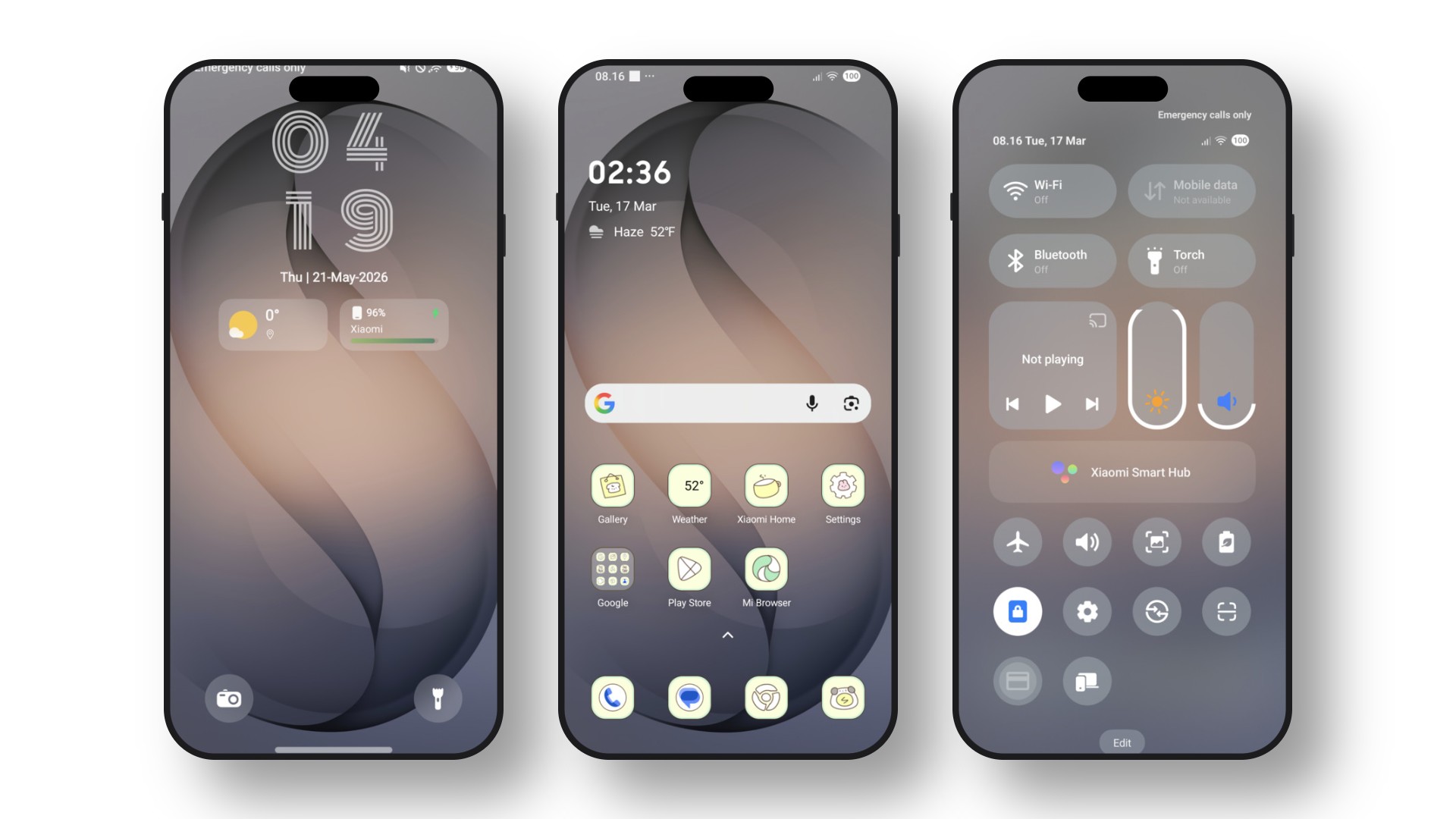
Overview of the Play-3e HyperOS Theme
Give your phone a fresh, new look with the Play-3e Xiaomi HyperOS Theme. This beautiful HyperOS Theme For Xiaomi Redmi Poco is designed to completely change how your phone feels. It is a high-quality MTZ Theme that is very easy to use and makes your phone look amazing. By applying this MTZ file, you get clean icons, a cool lock screen, and a much better-looking control center.
What makes the Play-3e HyperOS Theme special?
- Awesome Lock Screen: A fun, unique, and interactive lock screen that stands out.
- Clean Icons: Simple and fresh-looking icons for your system and favorite apps.
- Better Control Center: A smooth, neat, and easy-to-use quick settings menu.
- Cool System Looks: Looks great in dark mode and supports helpful home screen widgets.
Theme Previews
Download Information
| Theme Name | Play-3e |
|---|---|
| Designer | Eto'o |
| Apply Theme | Theme Store MTZ File |

Installation Guide
A) Apply Play-3e HyperOS Theme Through Official Theme Store
(For Stock HyperOS or MIUI devices)
- Open this page in your browser.
- Tap the Theme Store link from the table above.
- The Xiaomi Themes App will open automatically.
- Press Download, then tap Apply.
- The Play-3e HyperOS Theme will apply instantly.
Note: This is the most stable and reliable installation method for official ROM users.
B) Apply Play-3e HyperOS Theme (MTZ) on Custom ROMs
- Download the MTZ file using the button above.
- Open the Xiaomi Themes app.
- Go to Profile → Import → Select the MTZ file.
- Tap Apply.
Pro Tip: Restart your device (optional, but improves theme stability and prevents third-party icons from breaking).
Frequently Asked Questions
How to install the Play-3e HyperOS Theme?
You can easily install the Play-3e theme by downloading the MTZ file or applying it directly from the official Xiaomi Theme Store link provided in the download section above.
Is the Play-3e theme compatible with MIUI?
Yes, while Play-3e is optimized for HyperOS, it is also fully compatible with most Xiaomi, Redmi, and Poco devices running MIUI 14 and MIUI 13.
Does Play-3e support Dark Mode?
Absolutely! The Play-3e theme features full dark mode support, providing a sleek, battery-friendly, and eye-soothing experience on your device.
How can I download the Play-3e theme from www.hyperosthemes.org?
You can easily download the Play-3e theme by scrolling up to the 'Download Information' table. Simply click on the direct 'Theme Store' or 'MTZ File' link provided by www.hyperosthemes.org for a secure and fast installation.
